
s20: Comprehensive Agent — All Mechanisms, One Loop
s01 → ... → s18 → s19 → s20
"Many mechanisms, one loop" — tools, permissions, memory, tasks, teams, and plugins all hang off the same
while True.Harness layer: Comprehensive — put the previous 19 mechanisms back into one runnable system.
Problem
The first 19 chapters add one mechanism at a time. That is the right way to learn, but a real agent does not run with only one mechanism enabled.
A long-running coding agent needs all of these at once:
- tool dispatch and permission boundaries
- hook extension points
- todo planning and task graphs
- skills, memory, and runtime system prompt assembly
- compaction and error recovery
- background tasks and cron scheduling
- teams, protocols, autonomous claiming
- worktree isolation
- MCP external tool integration
The hard part is not piling up features. The hard part is seeing where each mechanism belongs around the loop. S20 is the endpoint chapter: every component is placed back into one harness.
Solution
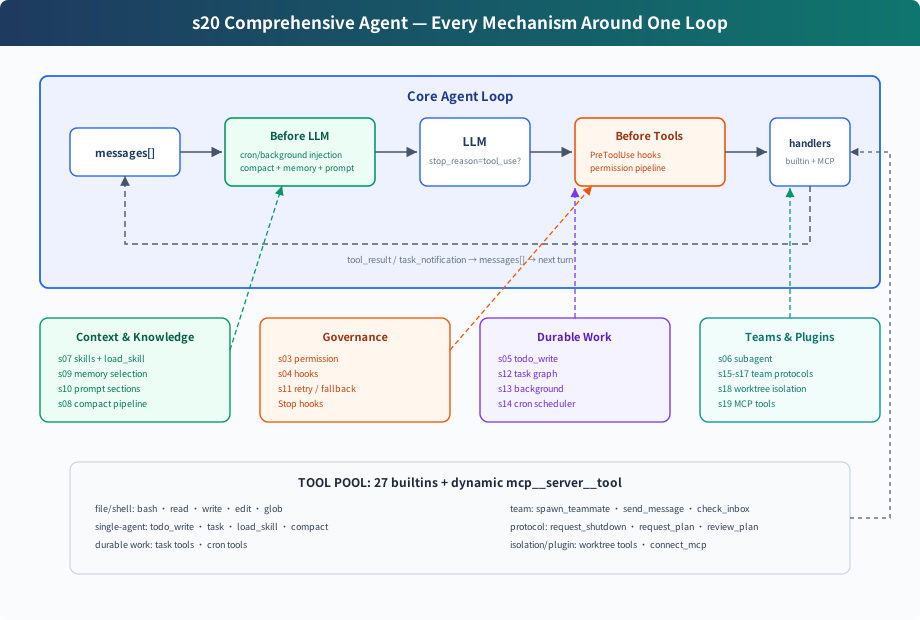
S20 does not invent a new mechanism. It merges the teaching components from the earlier chapters into one complete harness:
The loop is still the same structure: call the model, check whether the response contains a tool_use block, execute tools, append results back to messages. CC source does not directly trust stop_reason == "tool_use"; the actual presence of a tool_use block is the continuation signal. What changed is that the harness around the loop is now complete.
Where Each Component Sits
What code.py Contains
Tools and Dispatch
The built-in tool pool contains 27 tools:
assemble_tool_pool() assembles these every round:
After connect_mcp("docs"), the next round exposes tools like mcp__docs__search.
Permissions and Hooks
Permission is not hardcoded into the tool execution line. It is a PreToolUse hook:
That means permission, logging, and audit logic all attach to the same hook point. After execution, PostToolUse hooks run.
Planning and Tasks
S20 keeps two planning layers:
todo_write: lightweight plan for the current session, kept in memory- task graph: cross-session, dependency-aware, claimable task files under
.tasks/task_*.json
The first keeps a single agent from drifting. The second supports team coordination.
Subagents and Teams
S20 has two kinds of delegation:
task: one-shot subagent. It uses an isolatedmessages[], discards intermediate context, and returns only a final summary.spawn_teammate: persistent teammate thread. It communicates throughMessageBus, polls the task board while idle, and can claim work autonomously.
One-shot subagents solve context isolation. Persistent teammates solve long-running parallel collaboration.
Memory, Skills, and Prompt
assemble_system_prompt(context) assembles each round from:
- identity and tool guidance
- workspace
- skills catalog
.memory/MEMORY.md- connected MCP servers
Skills only put their catalog into the system prompt. Full content is loaded on demand through load_skill(name).
Compaction and Recovery
Before the LLM call, S20 runs the compaction pipeline:
The model call is wrapped with recovery:
- 429: exponential backoff retry
- 529: exponential backoff, optionally switch to fallback model after repeated failures
max_tokens: raise max tokens, then request continuation- prompt too long: reactive compact and retry
Background and Cron
Slow bash work does not block the main loop:
The cron scheduler runs as a daemon thread and checks once per second. The CLI watches cron_queue; when a job fires, it injects [Scheduled] ... and runs one agent turn automatically.
Worktree and MCP
Worktree isolation owns directories:
create_worktree(name, task_id)creates an isolated branch and directory- the task
worktreefield binds a task to that directory - when a teammate claims a task with a worktree, its bash/read/write tools run in that directory
MCP owns external capability:
connect_mcp(name)connects a mock serverassemble_tool_pool()assembles MCP tools into the tool pool- tool names use
mcp__server__tool
Changes from s19
Try It
Try:
Create a todo list for inspecting this repo, then list Python filesConnect to the docs MCP server and search for agent loopCreate two tasks, create worktrees for them, then spawn alice and bob. Ask them to submit plans before claiming tasks.remind me of the meeting in 3 minutes.Run npm install in the background and continue reading README.md
Watch for:
- whether each tool call passes through hooks/permission
- whether MCP tools appear on the next round after
connect_mcp - whether slow operations return a background placeholder
- whether cron automatically reminds you when the time arrives
- whether teammates submit plans and pause before approval
- whether teammates can claim tasks after plan approval
- whether teammates switch to the bound worktree directory
The End Is the Beginning
From s01 to s20, the code gets more capable, but the core remains unchanged:
Claude Code's complexity is not "another agent brain." It is the complexity of a mature harness. The model decides and chooses actions; the harness organizes environment, tools, permissions, memory, teams, and external capabilities.
This is the endpoint of the course: many mechanisms, one loop.