
s19: MCP Tools — External Tools, Standard Protocol
s01 → ... → s17 → s18 → s19 → s20
"External tools, standard protocol" — Discover, assemble, invoke. Agent doesn't need to know who wrote them.
Harness layer: Plugins — External capabilities via a standard protocol.
The Problem
From s01 through s18, every tool the agent uses was hand-written — bash, read, write, task, worktree. Input validation, execution logic, error handling — all written line by line.
Now you have 3 external services to integrate: the company's Jira API (query issues, create tickets), an in-house deployment system (trigger deploys, view logs), and the team's Notion knowledge base (search docs, create pages). You don't want to rewrite tool code for every service.
You need a standard protocol — as long as an external service implements it, the agent can call its tools directly, regardless of what language the service is written in.
The Solution
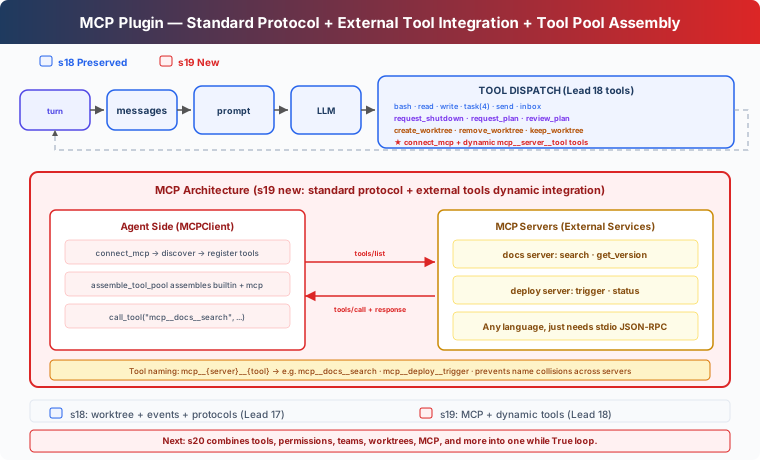 )
)
MCP (Model Context Protocol) defines how agents discover and invoke external tools. Core concepts:
Carries forward s18's teaching-version worktree isolation, autonomous claiming, idle polling, and protocol system. This chapter adds: the connect_mcp tool — connect to external services, discover tools, add them to the tool pool.
The tutorial uses mock handlers to simulate external servers. The real version would spawn subprocesses and communicate via stdin/stdout JSON-RPC. Mocks let you run the full flow without external dependencies; the tradeoff is you don't see real network communication or process management.
How It Works
MCPClient: Discovery + Invocation
The tutorial uses Python functions to simulate server tool implementations. The real version communicates with subprocesses via stdio JSON-RPC.
connect_mcp: Connect + Discover
After connecting, the server's tools are immediately available.
normalize_mcp_name: Name Normalization
All non-[a-zA-Z0-9_-] characters are replaced with _. Prevents special characters in server or tool names from causing naming conflicts or injection issues.
assemble_tool_pool: Assemble Tool Pool
The prefix mcp__{server}__{tool} prevents tool name collisions across different servers. Names are normalized through normalize_mcp_name.
MCP tool descriptions include (readOnly) or (destructive) annotations — the tutorial uses text annotations, while real CC uses structured tool annotations for the permission system.
No Cache: Tool Pool Changes, Prompt Changes Too
s10-s18's agent_loop used prompt caching to avoid re-serialization. s19 removes the cache:
Reason: after connect_mcp, the tool pool changes — new tools like mcp__docs__search are added. The cached tool list is stale; continuing to use it means the model can't call the new tools. The tutorial simply removes caching, at the cost of slightly more serialization time.
MCP Tools: Lead Only
In the tutorial, connect_mcp is a Lead tool, and assemble_tool_pool only serves the Lead's agent_loop. Teammates still use a fixed 8-tool subset (bash, read_file, write_file, send_message, submit_plan, list_tasks, claim_task, complete_task).
This is a teaching simplification. In real CC, MCP tools are available to both the main agent and sub-agents — sub-agents inherit the parent's MCP configuration.
Changes from s18
Try It Out
Try these prompts:
Connect to the docs MCP server and search for somethingConnect to the deploy server and trigger a deploymentConnect both servers — what tools are now available?
What to observe: After connecting to an MCP server, do tool names have mcp__docs__ or mcp__deploy__ prefixes? Are both servers' tools available simultaneously? Do MCP tool descriptions include (readOnly)/(destructive) annotations?
What's Next
The Agent can now connect external tools through a standard protocol. But the first 19 chapters each add one mechanism in isolation; a real Agent does not run as 19 separate demos.
Tools, permissions, hooks, todo, task graph, memory, compact, background work, cron, teams, worktrees, and MCP should all attach to the same loop, not live in separate examples.
s20 Comprehensive Agent → Combine the first 19 chapters into one complete harness. Many mechanisms, one loop.
Deep Dive into CC Source
The following is based on analysis of CC source:
services/mcp/client.ts,auth.ts,config.ts,channelNotification.ts.
1. Six Transport Types
The tutorial only shows a stdio mock. CC supports 6 transport types (types.ts:23-25):
On connection, local (stdio) and remote (http/sse/ws) servers are batched concurrently: local batch of 3, remote batch of 20.
2. Tool Pool Merging Algorithm
assembleToolPool() (tools.ts:345-364):
Built-in and MCP tools are sorted separately, not together. The reason is CC's claude_code_system_cache_policy places a global cache breakpoint after the last built-in tool at a specific position — mixing the sort would break this design.
3. Naming Convention: mcp__server__tool
buildMcpToolName() (mcpStringUtils.ts:50-52):
All non-[a-zA-Z0-9_-] characters are replaced with _ (normalization.ts:17-23). The tutorial's normalize_mcp_name uses the same rule.
4. Permission Checks
CC has a separate permission system for MCP tools. checkPermissions() applies different logic for MCP tools than for built-in tools — MCP tools can declare their own permission requirements (readOnly, destructive, etc.), and CC decides whether user confirmation is needed based on the declaration. The tutorial only uses text annotations (readOnly) / (destructive) in descriptions, without permission enforcement.
5. Configuration Sources and Priority
MCP server configuration comes from multiple sources. CC's priority from lowest to highest:
claude.ai connectors are fetched separately, deduplicated by content signature, and merged at the lowest precedence (config.ts:1267-1289). When enterprise managed-mcp.json exists, all other configurations are excluded.
The tutorial passes server names directly to the MOCK_SERVERS dict, without config merging.
6. Channel Notifications: Servers Push Messages Back
The tutorial only covers agent → MCP Server unidirectional calls. CC also supports reverse notifications (channelNotification.ts):
- Server declares
capabilities.experimental['claude/channel'] - Server sends messages to agent via MCP notification
notifications/claude/channel - Messages are wrapped in
<channel source="serverName">...</channel>XML tags - Agent is woken up by SleepTool (within 1 second)
Servers can also request permissions: notifications/claude/channel/permission_request → Agent replies notifications/claude/channel/permission. Users confirm/deny via a 5-letter short ID.
7. OAuth Authentication Flow
CC's MCP authentication (auth.ts) supports a full OAuth 2.0 + PKCE flow:
- OAuth metadata discovery via public client + PKCE (RFC 8414 / RFC 9728)
- Local callback server receives authorization code
- Tokens persisted via
getSecureStorage()(macOS Keychain / Linux encrypted file / Windows Credential Manager) - Auto-refresh 5 minutes before expiry
- Cross-application access (XAA): browser gets id_token → RFC 8693 + RFC 7523 exchange → no repeated browser popups
8. Connection Lifecycle Error Handling
CC has fine-grained error classification and retry for MCP connections (client.ts:1266-1402):
- Terminal errors (ECONNRESET, ETIMEDOUT, EPIPE, etc.): 3 consecutive failures → close + reconnect
- Tool call 401: Token expired → throw
McpAuthError→ trigger re-authentication - Tool call timeout:
Promise.racetimeout (configurable, default ~28 hours) - Stdio disconnect: Kill process in SIGINT → SIGTERM → SIGKILL order
The Tutorial's Simplifications
- 6 transport types → 1 (mock stdio): Manageable concept count
- Channel reverse notifications → omitted: Tutorial agent is always the initiator
- OAuth flow → omitted: Tutorial assumes servers need no auth
- Multi-layer config priority → omitted: Tutorial passes server name directly
- Complex error classification → omitted: Tutorial uses try/except as fallback
- MCP tools Lead-only → omitted sub-agent inheritance: Simplifies code structure