
s18: Worktree Isolation — Separate Directories, No Conflicts
s01 → ... → s16 → s17 → s18 → s19 → s20
"Separate directories, no conflicts" — Tasks own the goal, worktrees own the directory, bound by ID.
Harness Layer: Isolation — Parallel execution in separate directories.
The Problem
In s17, Alice and Bob both work in the same directory. Alice's task is "refactor auth module", Bob's task is "refactor UI login page".
Alice calls write_file("config.py", ...). Bob also calls write_file("config.py", ...). Both edit the same file, overwriting each other. And there's no clean rollback — you can't tell whose changes are whose.
s15-s17 solved "who does what" (task system) and "how to communicate" (message bus), but not "where to work".
The Solution
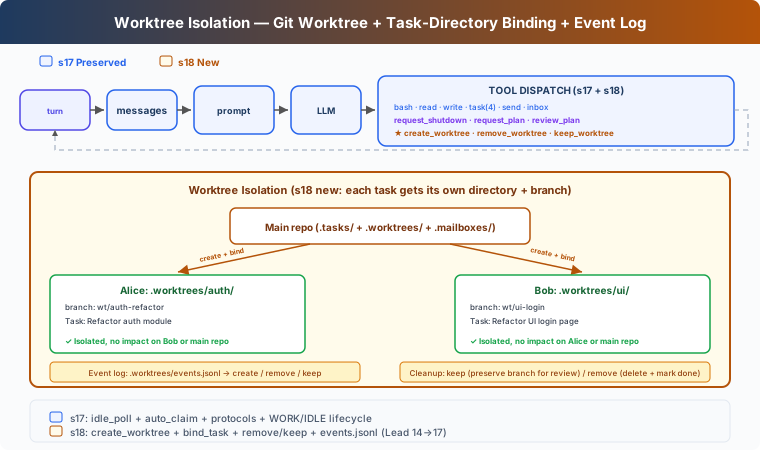 )
)
Git worktree lets you create multiple independent working directories in the same repo, each with its own branch. Alice works in .worktrees/auth-refactor/, Bob in .worktrees/ui-login/ — no conflicts.
Carries forward S17's teaching-version MessageBus, protocols, and autonomous claiming. This chapter adds:
How It Works
Creation: Task-Worktree Binding
Binding rule: one task binds to one worktree. Binding does NOT change task status — the task stays pending, and advances to in_progress only when a teammate claims it. This way Lead can pre-create tasks and worktrees, and teammates naturally claim worktree-bound tasks during idle.
Teammate Tool Cwd Switching
Teaching version maintains a wt_ctx dict per teammate, tracking the current worktree path. When a teammate claims a task with a worktree, wt_ctx is automatically set to the worktree path; the teammate's bash, read_file, write_file execute in the worktree directory:
This is a teaching simplification. Real CC's EnterWorktree uses process.chdir() to switch the entire process directory, and AgentTool isolation uses cwdOverride to wrap sub-agent execution.
Cleanup: Keep or Remove
After task completion, two choices:
Keep = preserve branch for manual review and merge. Remove = refuse by default if uncommitted changes; requires discard_changes=true to confirm. Does NOT auto-complete task — task completion is triggered explicitly by the teammate's complete_task.
Event Log: Auditable
Each lifecycle operation writes to a log for auditing:
Event types: create, remove, keep. Teaching version logs events for manual auditing; full recovery would need an index or git worktree list scanning.
run_git: Returns Success/Failure
create_worktree and remove_worktree only write event logs after successful git commands, ensuring logs reflect actual state.
Changes from s17
Try It
Try this prompt:
Create two tasks, then create worktrees for each (bind with task_id). Spawn alice and bob. Watch them auto-claim and work in isolated directories.
What to observe: Do both worktrees show different branches in git status? After claiming a worktree-bound task, does the teammate's bash run in the worktree directory? Does remove_worktree refuse when there are changes? Is task status still pending after binding?
What's Next
Agent teams can now self-organize in isolated workspaces. But Agent capabilities are limited to the tools we wrote — bash, read, write, task...
What if users already have their own tools? Like an internal Jira API, or a custom deployment system?
s19 MCP Plugin → Give Agent a plugin system. External tools connect via standard protocol; Agent doesn't need to know who wrote them.
Deep Dive into CC Source
CC's worktree system has two paths: EnterWorktree (current session switches in) and AgentTool isolation (sub-agent isolation).
EnterWorktree: Current Session Switch
EnterWorktreeTool.ts:92-97 after creating the worktree, immediately calls process.chdir(worktreePath), setCwd(), setOriginalCwd(), saveWorktreeState(). The current session's working directory switches directly to the worktree — not a prompt hint, but a process-level directory change.
ExitWorktreeTool.ts:261-320 both keep and remove call restoreSessionToOriginalCwd() to restore the original directory. Remove checks for uncommitted changes (ExitWorktreeTool.ts:190-220), refusing without discard_changes: true.
AgentTool Isolation: Sub-Agent Isolation
AgentTool.tsx:590-641 when isolation: "worktree", calls createAgentWorktree() to create a worktree, uses cwdOverridePath to wrap sub-agent execution. All sub-agent operations automatically run in the worktree directory. AgentTool/prompt.ts:272 tells the model: this is a temporary worktree, auto-cleanup if no changes, return path and branch if changes exist.
worktree.ts:902-951 createAgentWorktree() does NOT modify global session cwd, only for sub-agent use. worktree.ts:961-1020 removeAgentWorktree() deletes from the main repo root.
Name Validation
worktree.ts:76-84 validates slug: rejects ./.., allows [a-zA-Z0-9._-]. worktree.ts:48 defines VALID_WORKTREE_SLUG_SEGMENT. Teaching version's validate_worktree_name uses the same rule.
Path and Branch Naming
Real path is .claude/worktrees/, branch name worktree-{slug} (worktree.ts:204-227, slashes replaced with +). Teaching version uses .worktrees/ and wt/{name} for simplicity.
Creation uses git worktree add -B (worktree.ts:326-328), preferring origin/<defaultBranch> over current HEAD.
State Management
CC has no task-worktree binding. Worktree state is managed through PersistedWorktreeSession (worktree.ts:756-768), with fields including originalCwd, worktreePath, worktreeName, worktreeBranch, originalBranch, originalHeadCommit, sessionId, etc. — no taskId field. saveWorktreeState() (sessionStorage.ts:2883-2920) writes to session transcript with type: 'worktree-state'.
Teaching version uses the task's worktree field for binding, a teaching simplification. CC treats worktree and task as two independent systems, connected through the Agent's context understanding.