
s08: Context Compact — Context Will Fill Up, Have a Way to Make Room
s01 → s02 → s03 → s04 → s05 → s06 → s07 → s08 → s09 → s10 → ... → s20
"Context will fill up — have a way to make room" — Four-layer compression pipeline: cheap first, expensive last.
Harness Layer: Compression — clean memory, unlimited sessions.
The Problem
The agent is running along, then freezes.
It has bash, read, write — all the capabilities it needs. But it read a 1000-line file (~4000 tokens), then read 30 more files, ran 20 commands. Every command's output, every file's contents, all pile up in the messages list.
The context window is finite. Once full, the API outright rejects the call: prompt_too_long.
Without compression, an agent simply cannot work on large projects.
The Solution
 )
)
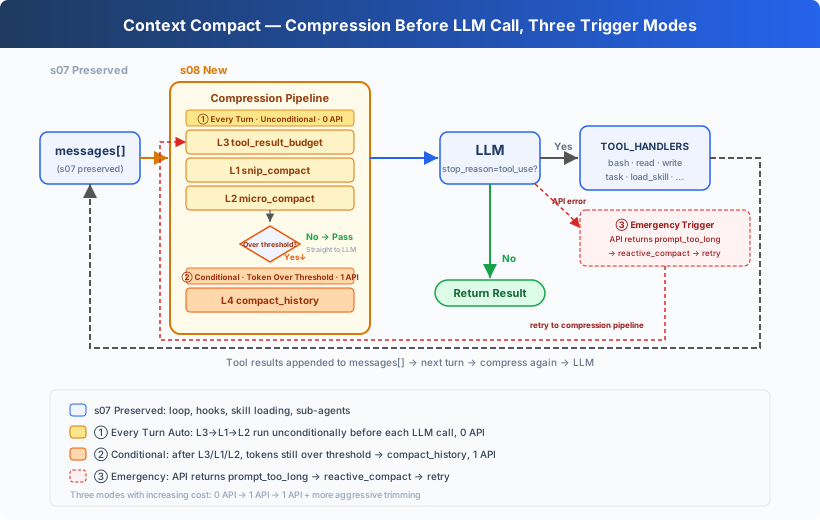
The hook structure, skill loading, and sub-Agent from s07 are preserved, with some tools omitted to focus on compaction. The core change: insert three pre-processors (0 API calls) before each LLM call, trigger an LLM summary (1 API call) when tokens still exceed the threshold, and emergency-trim if the API throws an error.
Core design: cheap first, expensive last.
How It Works
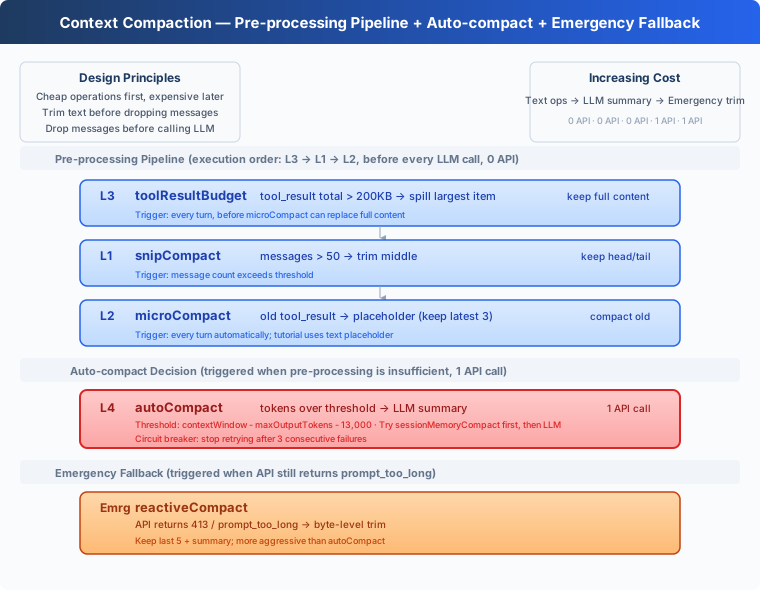 )
)
L1: snip_compact — Trim Irrelevant Old Conversation
The agent ran 80 turns of conversation, accumulating 160 messages. The very first "help me create hello.py" is barely relevant to current work, yet it still occupies space.
Message count exceeds 50 → keep the first 3 (initial context) and the last 47 (current work), trim the middle:
Entire messages are trimmed, but tool_result content within remaining messages keeps accumulating — message #34 may still hold 30KB of old file contents. → L2.
L2: micro_compact — Placeholder for Old Tool Results
 )
)
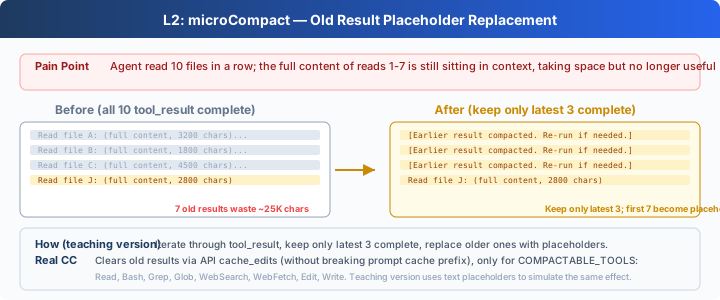
The agent read 10 files consecutively. The full contents of reads 1–7 are still sitting in context, no longer needed, but hogging large amounts of space.
Keep only the 3 most recent tool_result entries intact; replace older ones with a one-line placeholder:
Old results are cleared, but a single new result can be 500KB — one cat of a large file can max out the context. → L3.
L3: tool_result_budget — Persist Large Results to Disk
 )
)
The model read 5 large files in one go; all tool_result blocks in the last user message total 500KB.
Sum the size of all tool_result blocks in the last user message. If over 200KB → sort by size, starting from the largest, persist to .task_outputs/tool-results/, keeping only a <persisted-output> marker + a 2000-character preview in context. The model sees the marker and knows the full content is on disk, re-reading it when needed.
The first three layers are all plain-text / structural operations — 0 API calls — but they cannot "understand" conversation content. Context may still be too large. → L4.
L4: compact_history — Full LLM Summary
 )
)
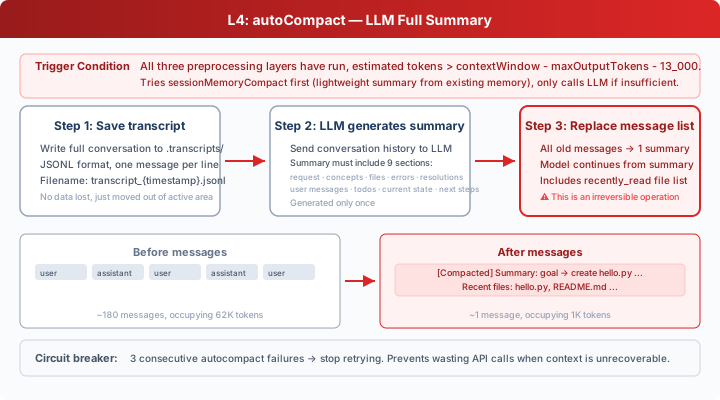
All three previous layers have run, but after 30 minutes of continuous work on a huge project, tokens still exceed the threshold.
Three-step process:
- Save transcript: Write the full conversation to
.transcripts/in JSONL format. The transcript preserves a recoverable record, but the model's active context only contains the summary. For the model's current reasoning, the details are no longer in context. The teaching code does not provide a transcript retrieval tool. - LLM generates summary: Send conversation history to the LLM, asking it to preserve key information: current goals, important findings, modified files, remaining work, user constraints, etc.
- Replace message list: All old messages are replaced with a single summary. The teaching version only keeps the summary; the real Claude Code re-attaches some recent files, plans, agent/skill/tool context after compaction.
Circuit breaker: After 3 consecutive failures, stop retrying to prevent an infinite loop wasting API calls.
Reactive: reactive_compact
Sometimes the API still returns prompt_too_long (413) — when context grows faster than compression triggers.
This triggers reactive_compact: more aggressive than compact_history, it retreats from the tail, trimming to an API-acceptable size with byte-level precision, keeping only the last 5 messages + summary.
Reactive compact has a retry limit (default 1). If it still fails, an exception is raised instead of looping forever. Full error recovery is deferred to s11.
Putting It All Together
The order must not be swapped. L3 (budget) runs before L2 (micro) because micro replaces old large tool_results with one-line placeholders — budget must persist the full content before that happens. This is why CC source puts applyToolResultBudget first.
Changes From s07
Try It
Try these prompts:
Read the file README.md, then read code.py, then read s01_agent_loop/README.md(read multiple files consecutively, observe L2 compressing old results)Read every file in s08_context_compact/(read a large amount of content at once, observe L3 persisting to disk)- Chat for 20+ turns, observe whether
[auto compact]or[reactive compact]appears
What to watch for: After each tool execution, are old tool_result entries compressed? When tokens exceed the threshold after extended conversation, is summarization triggered automatically?
What's Next
Context compression lets an agent run for a long time without crashing. But after each compression, the preferences and constraints the user told it are also lost. Can we let the agent selectively remember important things?
s09 Memory → three subsystems: choosing what to remember, extracting key information, consolidating and organizing. Across compressions, across sessions.
Deep Dive Into CC Source Code
The following is based on analysis of CC source code
compact.ts,autoCompact.ts,microCompact.ts, andquery.ts.
Execution Order Comparison
The teaching version labels layers L1/L2/L3/L4 for pedagogical clarity, but actual execution order does not match the numbering:
Execution Order Details
The real order in CC source query.ts:
applyToolResultBudget(L379): persist large results first, ensuring full content is savedsnipCompact(L403): trim middle messagesmicrocompact(L414): old result placeholderscontextCollapse(L441): independent context management system (not in teaching version)autoCompact(L454): LLM full summary
The teaching version's budget → snip → micro order matches this. The teaching version does not have the contextCollapse mechanism.
Full Constant Reference
contextCollapse and sessionMemoryCompact
CC source code has two additional mechanisms not covered in this teaching version:
- contextCollapse: An independent context management system that, when enabled, suppresses proactive autocompact (
autoCompact.ts:215-222), with collapse's commit/blocking flow taking over context management. Manual/compactand reactive fallback remain independent paths, unaffected by contextCollapse. - sessionMemoryCompact: Before compact_history, CC first attempts a lightweight summary using existing session memory (covered in s09) without calling the LLM. This mechanism becomes clearer after learning s09.
What Does the Compression Prompt Look Like?
CC's compression prompt has two hard requirements:
- Absolutely no tool calls: It begins with
CRITICAL: Respond with TEXT ONLY. Do NOT call any tools., and appends another REMINDER at the end - Analyze first, then summarize: The model must first reason in an
<analysis>tag, then output the formal summary in a<summary>tag. The analysis is stripped during formatting
Teaching Version Simplifications Are Intentional
- micro_compact uses text placeholders → we don't have API-level
cache_editsaccess - Tokens estimated via character count → precise tokenizers are out of scope
- Post-compaction recovery omitted → teaching version only keeps summary, does not auto re-attach files
- Two auxiliary mechanisms not covered → they fall in the 10% detail category
The core design principle, cheap first, expensive last, is fully preserved.