
s02: Tool Use — Add a Tool, Add Just One Line
s01 → s02 → s03 → s04 → ... → s20
"Add a tool, add just one handler" — The loop stays the same. Register the new tool in the dispatch map and you're done.
Harness Layer: Tool Dispatch — Expanding the model's reach.
Only One Tool: Bash
The s01 Agent has only one tool: bash. To read a file, cat; to write, echo "..." > file.py; to edit, sed.
The model thinks "read this file" but has to spell out cat path/to/file. An extra layer of translation that wastes tokens and invites errors.
Overview: Tool Dispatch
 )
)
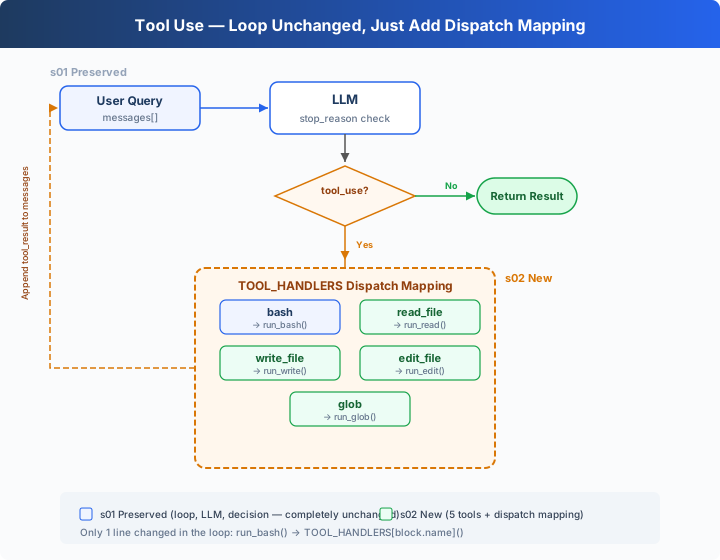
The s01 loop is fully preserved (LLM call, stop_reason check, message append — not a single word changed). The only change is in that one line of tool execution: run_bash() is replaced with TOOL_HANDLERS[block.name]() dispatch lookup.
Adding a tool to the Agent requires just two things:
- Define the tool: Add one entry to the
TOOLSarray - Register the handler: Add one mapping in the
TOOL_HANDLERSdict
From 1 Tool to 5 Tools
s01 had only bash:
s02 expands to 5 tools, each independently defined:
Each tool has its own implementation function:
Tool Dispatch
Adding a tool = one entry in TOOLS array + one line in TOOL_HANDLERS dict. The loop stays the same.
Multiple Tool Calls
The model often returns multiple tool_use calls at once — "read a.py and b.py, then list all .py files".
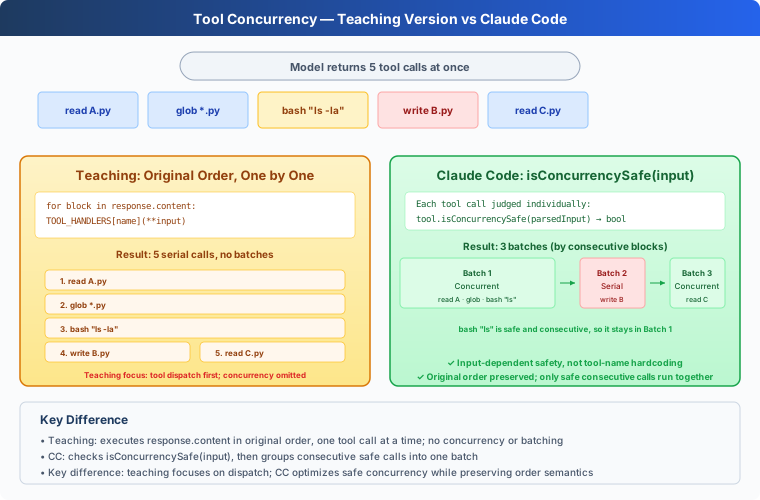
The teaching version executes them one by one in the original response.content order. CC's approach is more complex: it slices the original order into consecutive batches, where concurrency-safe tools within a batch run in parallel, and batches are strictly sequential (see appendix).
Quick Reference
Changes from s01
Try It
Try these prompts:
Read the file README.md and tell me what this project is aboutCreate a file called test.py that prints "hello", then read it backFind all Python files in this directoryRead both README.md and requirements.txt, then create a summary file
What to watch for: When does the model call just one tool, and when does it call multiple at once? Are multiple tool calls executed in the correct order?
What's Next
The Agent now has 5 specialized tools. File tools are protected by safe_path, but bash is unrestricted — rm -rf / still runs.
→ s03 Permission: Add a gate before tool execution — is this operation safe? Does it need user approval?
Dive into CC Source Code
The following is based on a review of CC source code
Tool.ts,tools.ts,toolOrchestration.ts,toolExecution.ts, andStreamingToolExecutor.ts.
1. Tool Definition Approach
Teaching version: TOOLS array + TOOL_HANDLERS dict. Definition and implementation are separate.
CC: Each tool is an independent object created by buildTool(), containing schema, validation, permissions, and execution. getAllBaseTools() aggregates all tools.
The teaching version's separation is clearer for teaching — readers immediately see "add a tool = two definitions".
2. Concurrency Safety: isConcurrencySafe()
 )
)
The teaching version executes tools one by one in original order, without concurrency. CC uses isConcurrencySafe(input) to determine concurrency — note this isn't simply "read-only vs write", but judges by specific input:
CC's Bash tool's isConcurrencySafe equals isReadOnly — read-only commands can be concurrent, write commands cannot. TaskCreate modifies task files, but each writes a different file, so it can be concurrent.
3. Partition Algorithm
CC's partitionToolCalls() (toolOrchestration.ts:91-115) doesn't split into two groups — it batches tool calls by consecutive blocks:
Consecutive concurrency-safe calls are grouped into the same batch for truly concurrent execution (toolOrchestration.ts:152-176, with a concurrency limit). When a non-concurrency-safe call is encountered, a new batch starts for serial execution. Batches are strictly sequential.
4. Validation Pipeline
Each tool call in CC goes through a strict 5-step validation (toolExecution.ts):
- Zod schema validation (
614-680, teaching version uses JSON Schema): parameter type/structure check - Tool-level validateInput() (
682-733): parameter value validation (e.g., is the path within the working directory) - PreToolUse hooks (
800-862, covered in s04): hooks can return messages, modify input, or block execution - Permission check (
921-931, core topic of s03): canUseTool + checkPermissions → allow/deny/ask - Execute tool.call() (
1207-1222)
The teaching version omits Zod (uses JSON Schema), omits validateInput (uses safety functions), but preserves the permission check and hook concepts.
5. Streaming Tool Execution
CC's StreamingToolExecutor (StreamingToolExecutor.ts) starts tools while the model is still generating — no waiting for the model to finish. read_file might complete while the model is still outputting "Let me analyze". The teaching version doesn't implement this, consistent with s01's goal — conceptual clarity, not peak performance.
6. Tool Result Persistence
Each tool has a maxResultSizeChars field. Results exceeding this threshold are persisted to disk, and the model sees a preview + file path. FileRead is special — set to Infinity, preventing file read output from being persisted again. Specifically, if FileRead's result exceeds the threshold and gets persisted, the model's next read of that persisted file would trigger another persistence → infinite loop (read file → persist → re-read → re-persist → ...).