
s10: System Prompt — Assembled at Runtime, Never Hardcoded
s01 → ... → s08 → s09 → s10 → s11 → s12 → ... → s20
"prompt is assembled, not hardcoded" — Sections + on-demand assembly + caching.
Harness Layer: Prompt — assembled at runtime, never hardcoded.
The Problem
From s01 to s09, the system prompt was always one hardcoded line:
That worked for s01 — only bash, read, write. But by s09, the agent has memory, compression, skill loading. The prompt needs to describe more and more capabilities:
Three problems:
- Switching projects requires rewriting the entire prompt — no way to know what to change and what to keep
- One change can break others — adding a tool description might conflict with earlier instructions
- Every request carries everything — even when the current conversation doesn't need certain sections, they waste tokens
The system prompt should be a configuration assembled at runtime based on current state: which tools are enabled, which context is visible, which memories are relevant, and which content must remain stable to hit prompt cache.
The Solution
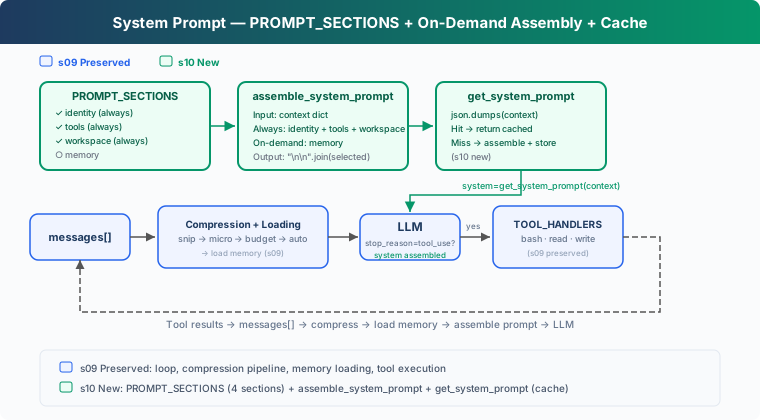 )
)
s10 focuses on prompt assembly. It builds on the s08-s09 capabilities but doesn't re-implement compression or memory. The core change: split the hardcoded SYSTEM into independent sections, assemble them at runtime based on real state, and cache the result.
Four sections, two loading strategies:
Key design: whether a section loads depends on real state (tools exist, files exist), not keywords in messages.
How It Works
PROMPT_SECTIONS: Topic-Keyed Fragments
Split the monolithic string into a dictionary, each key is a topic:
Each section is maintained independently. Changing tools doesn't affect identity; adding memory doesn't touch workspace.
assemble_system_prompt: On-Demand Assembly
Not every section is needed every turn. No memory files? Loading the memory section just wastes tokens. Assembly is based on real state in context:
"Always loaded" sections are needed every turn: identity, tools, workspace. "On-demand" sections are only useful under specific conditions.
Why not load everything? Tokens have cost (system prompt is billed every turn), and fewer instructions means more focused output (irrelevant instructions are noise).
get_system_prompt: Cache to Avoid Re-Assembly
When context hasn't changed (multiple LLM calls in the same turn with the same context), re-assembling is wasteful. Use deterministic serialization to detect changes and return cached result:
json.dumps instead of hash(): Python's built-in hash() has process randomization (unsuitable for stable cache keys) and throws unhashable type on nested dicts/lists.
Note: this cache only avoids redundant string assembly within a process. It's not the same as CC's API prompt cache, which uses SYSTEM_PROMPT_DYNAMIC_BOUNDARY to separate static and dynamic parts — the static parts hit global cache and don't invalidate when dynamic content changes.
context: Real State, Not Keyword Guessing
Context reflects the actual runtime state:
enabled_tools lists actually registered tools. memories checks whether .memory/MEMORY.md exists. Section loading is based on this real state, not searching for keywords in messages.
Putting It Together
At the start of each loop iteration, get the system prompt. If context changed, re-assemble; if not, return cached version.
Changes From s09
Try It
What to watch for:
- Output shows which sections were loaded (
[assembled] sections: ...label) - Cache hits show
[cache hit]during continued conversation - Creating
.memory/MEMORY.mdmakes the memory section appear on the next turn
Try these prompts:
Read the file README.md(observe the three always-loaded sections)Create a file called .memory/MEMORY.md with content "- [test](test.md) — test memory"(write a memory index)Read the file code.py(observe whether the memory section appears)
What's Next
System prompts can now be assembled at runtime. But the agent still crashes on errors. Network hiccups, API rate limits, truncated output, context overflow — these aren't bugs, they're normal.
s11 Error Recovery → four recovery paths. Upgrade tokens, compress context, exponential backoff, switch models.
Deep Dive Into CC Source Code
The following is based on analysis of CC source code
constants/prompts.ts(914 lines),constants/systemPromptSections.ts(68 lines),context.ts(189 lines),utils/api.ts(718 lines),utils/systemPrompt.ts(123 lines), andbootstrap/state.ts.
How many sections does CC's system prompt have?
The count varies based on feature flags, output style, KAIROS/Proactive mode, user type, token budget, etc. Roughly two categories:
Static sections (always loaded): identity, system, doing_tasks, actions, using_tools, tone_style, output_efficiency, etc.
Dynamic sections (loaded by state): session_guidance, memory, ant_model_override, env_info_simple, language, output_style, mcp_instructions, scratchpad, frc, summarize_tool_results, numeric_length_anchors, token_budget, brief, etc.
mcp_instructions is the only volatile section (created via DANGEROUS_uncachedSystemPromptSection()), because MCP servers can connect and disconnect between turns.
Assembly Function
Returns string[] (each element is a section), separated by SYSTEM_PROMPT_DYNAMIC_BOUNDARY between static and dynamic parts.
cache scope
When global cache boundary is enabled, static sections are merged into one global cache block, and dynamic sections don't use global cache (cacheScope: null). Only paths without boundary or skipping global cache fall back to org scope.
The teaching version's cache only avoids redundant string assembly. CC's three-layer cache:
- lodash memoize:
getSystemContextandgetUserContextcached per session (context.ts) - Section registry cache:
STATE.systemPromptSectionCachecaches dynamic section results, cleared on/clearor/compact - API-level cache:
splitSysPromptPrefix()(api.ts) splits prompt into blocks with different cache scopes via boundary
getUserContext vs getSystemContext
How modes change the prompt
- CLAUDE_CODE_SIMPLE: entire prompt is 2 lines
- Proactive/KAIROS: compact prompt replaces all standard sections
- Coordinator: coordinator-specific prompt fully replaces default
- Agent mode: agent-defined prompt replaces or appends to default
Total size
Standard interactive mode system prompt core is ~20-30KB text. CLAUDE_CODE_SIMPLE is ~150 characters. User context (CLAUDE.md) and system context (git status) add on top.