
s01: The Agent Loop — One Loop Is All You Need
s01 → s02 → s03 → s04 → ... → s20
"One loop & Bash is all you need" — One tool + one loop = one Agent.
Harness Layer: The Loop — the first bridge between the model and the real world.
The Problem
You ask the model: "List the files in my directory and run XXX.py."
The model can output a bash command, but once it's done outputting, it stops — it won't execute the command on its own, and it won't keep reasoning based on the result.
You could run it manually, paste the output back into the chat, and let it continue. Next command comes out, you run it again, paste it back.
Every round-trip, you're the middle layer. Automating that is what this chapter is about.
The Solution
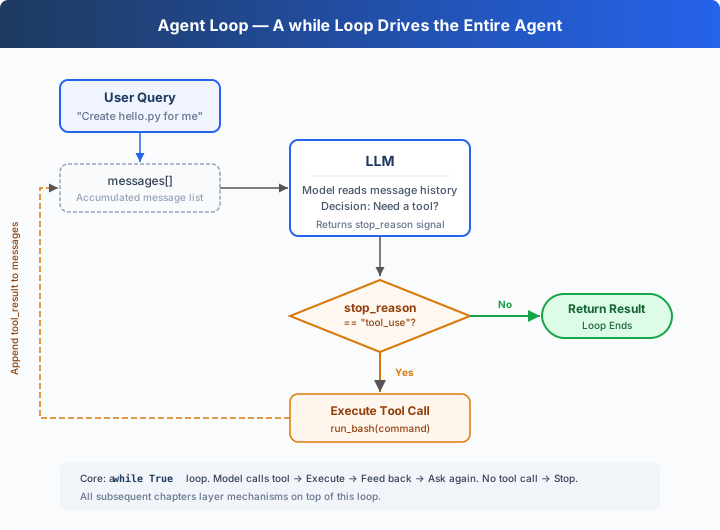 )
)
A while True loop: keep going when the model calls a tool, stop when it doesn't. The entire process hinges on two signals:
How It Works
Let's translate this process into code. Step by step:
Step 1: Start with the user's question as the first message.
Step 2: Send the messages and tool definitions to the LLM.
Step 3: Append the model's response and check whether it called a tool. No tool call → done.
Step 4: Execute the tool the model requested and collect the results.
Step 5: Append the tool results as a new message and go back to Step 2.
Assembled into a complete function:
Under 30 lines — that's the minimal runnable agent harness kernel. It's not intelligence itself, but the smallest runtime framework that lets the model keep acting. The model decides (whether to call a tool, which one), the harness executes (if called, run it, feed the result back). The next 18 chapters all add mechanisms on top of this loop. The loop itself never changes.
Try It
Teaching demo notice: The code executes shell commands generated by the model. Run it in a temporary test directory to avoid affecting your project files. s03 covers the real permission system.
Setup (first run):
Run:
Try these prompts:
Create a file called hello.py that prints "Hello, World!"List all Python files in this directoryWhat is the current git branch?
What to watch for: When does the model call a tool (loop continues), and when does it not (loop ends)?
What's Next
Right now the model only has bash — reading files requires cat, writing files requires echo ... >, finding files requires find. Ugly and error-prone.
→ s02 Tool Use: What happens when we give it 5 proper tools? Will the model call multiple tools at once? Will parallel tool executions step on each other?
Dive into CC Source Code
The following is based on a review of CC source code
src/query.ts(1729 lines). The core differences are twofold: CC doesn't rely on thestop_reasonfield to decide whether to continue the loop — instead it checks whether the content containstool_useblocks (becausestop_reasonis unreliable in streaming responses); CC has more exit paths and recovery strategies for production-grade protection.
The 30-line while True from the teaching version IS the core of CC's 1729 lines. Everything below is a protection mechanism layered on top of that core.
1. Loop Structure Differences
The teaching version checks response.stop_reason. CC doesn't use it as the sole signal for loop continuation — in streaming responses, stop_reason may not have updated yet even though tool_use blocks are already present. CC uses a needsFollowUp flag: during streaming message reception (query.ts:830-834), it's set to true whenever a tool_use block is detected. QueryEngine.ts captures the real stop_reason from message_delta for other logic, but the query loop itself relies on needsFollowUp.
2. State Object — 10 Fields (Teaching Version Only Uses messages)
Note:
taskBudgetRemaining(query.ts:291) is a loop-local variable, not on State. The source comment explicitly says "Loop-local (not on State)".
3. Multiple Exit and Continue Paths
The teaching version has only 1 exit path (model doesn't call a tool → done). The production version has multiple exit and continue paths, covering blocking limit, prompt too long, model error, abort, hook stop, max turns, token budget continuation, reactive compact retry, and more. Each scenario has a corresponding recovery or exit strategy.
4. Streaming Tool Execution and QueryEngine
CC's StreamingToolExecutor (query.ts:561) allows tools to begin parallel execution while the model is still generating (concurrency-safe tools run in parallel, others run exclusively). QueryEngine.ts adds additional protections for cost overruns, structured output validation failures, and more. The teaching version doesn't implement these — the goal is conceptual clarity, not peak performance.
In one sentence: The core of query.ts's 1729 lines is a 30-line while True. All the complex fields and exit paths are protection mechanisms. Understand the core loop first, and everything that follows unfolds naturally.