
s03: Permission — Check Permissions Before Execution
s01 → s02 → s03 → s04 → s05 → ... → s20
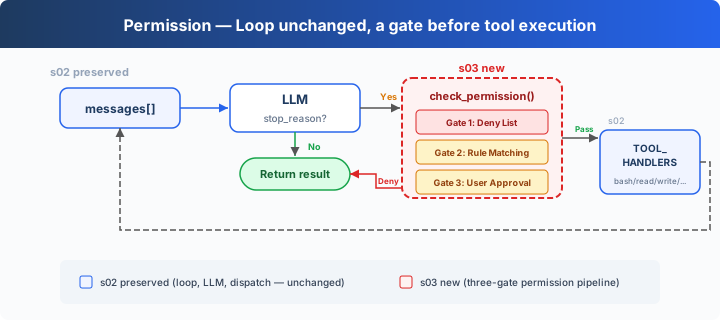
"Check permissions before executing" — The permission pipeline decides which operations need approval.
Harness Layer: Permission — a gate before tool execution.
The Problem
s02's Agent has 5 tools. File tools are protected by safe_path, but bash is unrestricted. Ask it to "clean up the project," and it might run rm -rf /.
Safety can't rely on trusting the model — it needs code: a check before every tool execution.
The Solution
 )
)
s02's loop is fully preserved. The only change is inserting check_permission() before tool execution — each tool call passes through three gates in a fixed order: hard deny first, then soft ask, and if neither matches, allow.
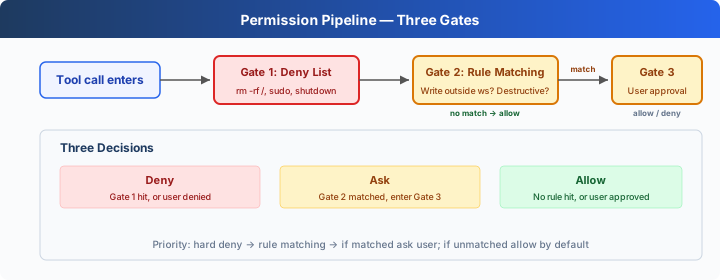
The three gates correspond to three decisions:
None of the three gates match → execute directly. Most routine operations take this path.
How It Works
 )
)
Gate 1: A hard deny list. Check first; if matched, return a block message. (Teaching demo: simple string matching is not a reliable security mechanism — command variants and shell expansion can bypass it. CC's approach is in the appendix.)
Gate 2: Rule matching — describes "when to ask the user." Each rule specifies a tool and a check condition.
Gate 3: After a rule matches, pause for user input.
All three gates chained together, inserted before tool execution:
Changes from s02
Try It
Try these prompts:
Create a file called test.txt in the current directory(should pass through)Delete all temporary files in /tmp(bash + rm triggers Gate 2)What files are in the current directory?(read-only, all pass)Try to write a file to /etc/something(writing outside workspace triggers Gate 2)
What to watch for: Which operations pass through? Which need your confirmation? Which are denied outright?
What's Next
Permission checks are in place — but every check is hardcoded as check_permission() inside the loop. What if you want to add logging before and after each tool execution? What if you want to auto-trigger a git commit after certain operations? Scattering this extension logic throughout the loop makes it bloat.
→ s04 Hooks: Add hooks to the loop. Extension logic hangs on hooks; the loop stays clean.
Dive into CC Source Code
The following is based on a review of CC source code
types/permissions.ts,utils/permissions/permissions.ts,toolExecution.ts,utils/permissions/yoloClassifier.ts,tools/AgentTool/forkSubagent.ts.
1. PermissionResult: Not 3, but 4
The teaching version's three gates (deny → ask → allow) don't fully correspond to CC. CC's PermissionResult has 4 behaviors (types/permissions.ts:241-266):
2. Production Verification Stages
CC's tool calls don't go through three gates — they go through multiple stages distributed across checkPermissionsAndCallTool() (toolExecution.ts:599-1745), hooks, hasPermissionsToUseToolInner() (utils/permissions/permissions.ts:1158-1310), and classifier logic:
- Zod schema validation (
toolExecution.ts:614-680) — parameter type checking - validateInput() (
toolExecution.ts:682-733) — tool-level semantic validation - backfillObservableInput() (
toolExecution.ts:784) — backfill legacy fields - PreToolUse hooks (
toolExecution.ts:800-862) — hooks can return allow/deny/ask - resolveHookPermissionDecision() (
toolExecution.ts:921-931) — coordinate hook + pipeline decisions - hasPermissionsToUseToolInner() (
permissions.ts:1158-1310) — multi-layer rule check:- Entire tool disabled by deny rule →
deny - Entire tool flagged by ask rule →
ask tool.checkPermissions()tool's own judgment- Tool itself returns deny →
deny requiresUserInteraction()→ask- Content-related ask rules →
ask(not bypassable) - Security check violation →
ask(not bypassable) - bypassPermissions mode →
allow - Entire tool allowed by allow rule →
allow - passthrough → converted to
ask
- Entire tool disabled by deny rule →
3. Deny List: Not One File, but 8 Sources
CC doesn't have a single deny list. Permission rules come from 8 sources (types/permissions.ts:54-62):
Each rule format: { toolName: "Bash", ruleBehavior: "deny", ruleContent: "npm publish:*" }. Rules from multiple sources are merged, with higher-priority sources overriding lower ones (low to high: user < project < local < flag < policy, plus cliArg, command, session).
4. What is isDestructive()
In CC, isDestructive (Tool.ts:405-406) is purely for UI display — showing a [destructive] label in the tool list. It doesn't participate in permission decisions. All tools return false by default. Only ExitWorktree (on remove) and MCP tools (depending on annotations.destructiveHint) override it.
5. YoloClassifier (Auto-Approval)
In CC's auto mode, it doesn't pop a dialog every time. classifyYoloAction (utils/permissions/yoloClassifier.ts:1012) sends the tool call + conversation context to a classifier LLM to judge safety. It first tries acceptEdits mode simulation (permissions.ts:620-656, if acceptEdits allows → auto-approve), then checks the safe tool whitelist (permissions.ts:658-686), and finally calls the classifier. If the classifier rejects too many times in a row → falls back to manual approval.
6. Permission Bubbling
A sub-Agent's (forked via AgentTool) permissionMode is set to 'bubble' (forkSubagent.ts:50). This means permission dialogs bubble up to the parent Agent's terminal, rather than being silently denied in the sub-Agent. The Bash classifier continues running during this process — displaying the permission dialog while judging in the background whether auto-approval is possible.
The Teaching Version's Simplification Is Intentional
- Multi-stage pipeline → 3 gates: dramatically lower barrier to understanding
- 8 rule sources → 1 local DENY_LIST: manageable concept count
- isDestructive → omitted (teaching version has no UI layer, and it doesn't participate in permission decisions in CC either)
- YoloClassifier → omitted (depends on additional LLM calls and telemetry)
- Permission bubbling → omitted (s15 covers multi-Agent)