
s09: Memory — Compression Loses Details, Keep a Layer That Doesn't
s01 → ... → s07 → s08 → s09 → s10 → s11 → ... → s20
"Compression loses details, keep a layer that doesn't" — File store + index + on-demand loading, across compactions, across sessions.
Harness Layer: Memory — knowledge that survives compaction and sessions.
The Problem
s08's autoCompact preserves current goals, remaining work, and user constraints in the summary, but details get lost: "use tabs not spaces" might get simplified to "user has code style preferences". And when you start a new session, even the summary is gone.
LLMs have no persistent state; all information lives in the context window. When context fills up, it gets compressed, and compression is lossy. What's needed is a storage layer that doesn't participate in compression and persists across sessions.
The Solution
 )
)
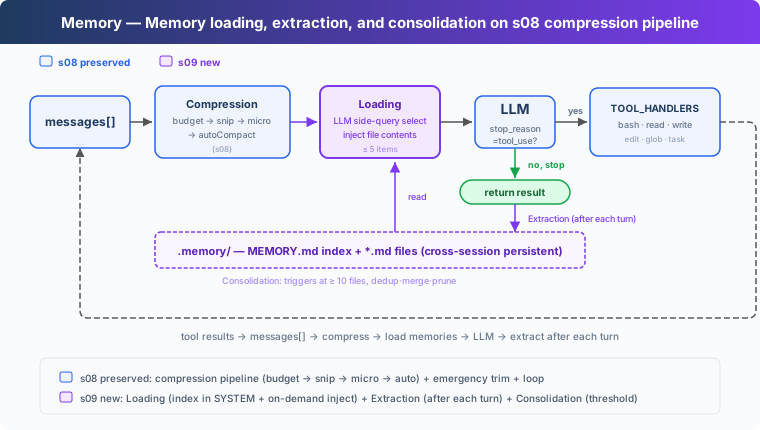
The s08 compression pipeline is preserved, focusing on memory. Storage uses the filesystem: a .memory/ directory where each memory is a .md file with YAML frontmatter (name / description / type). When files accumulate, an index is needed: MEMORY.md holds one link per line and gets injected into the SYSTEM.
Key design: the index stays in SYSTEM prompt (cacheable by prompt cache), file content is injected on demand (matched by filename/description to the current conversation, without breaking the cache). Writing has two paths: the user explicitly says "remember", or extraction runs in the background after each turn. When files accumulate, periodic consolidation deduplicates.
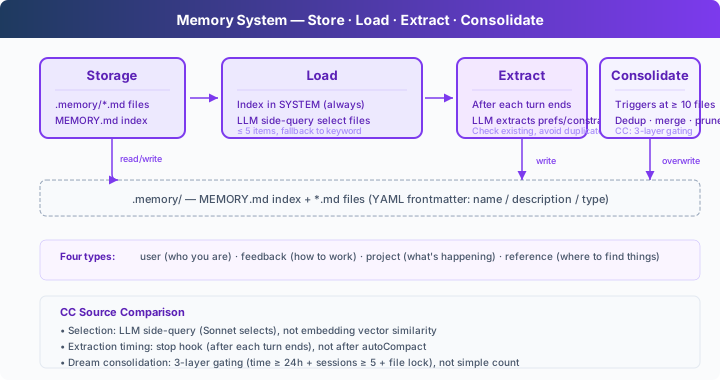
Four memory types, each answering a different question:
How It Works
 )
)
Storage: Markdown Files + Index
Each memory is a .md file with YAML frontmatter for metadata:
MEMORY.md is the index, one link per line:
Writing a new memory automatically rebuilds the index:
Loading: Two Paths
Path 1: Index in SYSTEM. build_system() reads MEMORY.md every turn and injects the memory catalog into the SYSTEM prompt. The index in SYSTEM can be cached by prompt cache, avoiding resending it every turn.
Path 2: Relevant memories on demand. Before each LLM call, load_memories() sends the recent conversation and the memory catalog (name + description) to the LLM as a lightweight side-query, selects relevant filenames, then reads and injects their contents. Capped at 5 to control cost.
If the side-query fails (API error, JSON parse failure), it falls back to keyword matching on name + description.
Writing: Extraction After Each Turn
Users don't always say "remember this". Preferences are usually scattered across normal dialogue: "tabs are better than spaces", "let's use single quotes from now on".
extract_memories() runs when each turn ends, triggered when the model stops without a tool_use (indicating the conversation has reached a natural break):
Before extraction, existing memories are checked to avoid duplicates. The extraction prompt asks the LLM to return a JSON array of {name, type, description, body}, writing files only when genuinely new information is found.
Consolidation: Low-Frequency Deduplication
Memory files accumulate. consolidate_memories() triggers when the file count reaches a threshold (default 10), asking the LLM to deduplicate, merge contradictions, and prune stale memories:
CC calls this process Dream, with four gates in practice: time interval, scan throttle, session count, file lock. The teaching version simplifies to a file-count threshold.
What Memory Stores
Memory stores information that remains useful across sessions: user preferences, recurring feedback, project background, common entry points, and investigation clues. It focuses on "what will be useful later" and brings that information back through an index plus on-demand loading.
Session memory focuses on continuity inside one session: what context should survive after compaction. The two work together: Memory handles long-term knowledge; session memory handles the current session across compaction.
Changes From s08
Try It
Try these prompts (enter across multiple turns, observe memory accumulation and loading):
I prefer using tabs for indentation, not spaces. Remember that.Create a Python file called test.py(observe whether the Agent uses tabs)What did I tell you about my preferences?(observe whether the Agent remembers)I also prefer single quotes over double quotes for strings.
What to watch for: Does [Memory: extracted N new memories] appear after each turn? Are .md files generated in .memory/? Is MEMORY.md index updated? Does the Agent automatically load previous memories in new conversations?
What's Next
Memory, compression, and tools are all in place. But the system prompt is still a hardcoded string. Adding a new tool means manually adding a description; switching projects means rewriting the whole prompt. Prompts should be assembled at runtime.
s10 System Prompt → segments + runtime assembly. Different projects, different tools, different prompts.
Deep Dive Into CC Source Code
The following is based on analysis of CC source code under
src/inmemdir/,services/,utils/,query/. Line numbers verified against source.
Source Code Paths
Memory Selection: LLM, Not Embedding
CC uses Sonnet itself to select (findRelevantMemories.ts), not embedding vector similarity:
memoryScan.tsscans all.mdfiles in.memory/(excluding MEMORY.md), max 200 files, sorted by mtime descending- Lists all memory files'
name+descriptionas a catalog - Sends to Sonnet side-query: "Select truly useful memories by name and description (max 5). Skip if unsure."
- Sonnet returns
{ selected_memories: ["file1.md", ...] } - Selected files' full contents are read (≤ 200 lines / 4096 bytes per file) and injected. Total session budget: 60KB
At the start of each user turn, query.ts:301-304 starts memory prefetch (async); after tool execution, 1592-1614 collects completed results non-blocking.
Extraction Timing: Stop Hook, Not After autoCompact
Trigger location (stopHooks.ts:141-155): inside handleStopHooks(), fire-and-forget triggers extraction and Dream. The teaching version places extraction in the stop_reason != "tool_use" branch, matching the direction.
CC's extraction runs via forked agent (extractMemories.ts:371-427): restricted permissions, skipTranscript: true, maxTurns: 5. Also has overlap protection: if the main Agent already wrote memory files, extraction is skipped.
Memory File Format
CC uses Markdown + YAML frontmatter, consistent with the teaching version. Four types: user, feedback, project, reference.
memdir.ts:34-38 defines index constraints: MEMORY.md max 200 lines / 25KB. memdir.ts:199-266 builds memory behavior instructions, explicitly distinguishing memory from plan and tasks. Storage location: ~/.claude/projects/<sanitized-git-root>/memory/.
Dream: Four-Layer Gating
Not "triggered when idle" or "consolidate when count is enough", but four gates (autoDream.ts, defaults 63-66, gating logic 130-190):
- Time gate: ≥ 24 hours since last consolidation
- Scan throttle: Avoid frequent filesystem scans
- Session gate: ≥ 5 session transcripts modified since last consolidation
- Lock gate: No other process currently consolidating (
.consolidate-lockfile)
The merge itself runs via forked agent (224-233): locate → collect recent signals → merge and write files → prune and update index. Lock file mtime serves as lastConsolidatedAt. Crash recovery: lock auto-expires after 1 hour.
User Memory vs Session Memory
sessionMemoryCompact (mentioned in s08) uses Session Memory: before autoCompact, it reads the session memory file and, if sufficient (≥ 10K tokens, ≥ 5 text messages, ≤ 40K tokens, sessionMemoryCompact.ts:56-61), uses it as a summary without calling the LLM.
Where the Real Implementation Is More Complex
- Feature flags: Memory features have multiple feature gate layers
- Team memory: Shared team memories,
loadMemoryPrompt()has a dedicated path (not covered in teaching version) - KAIROS: Timing-aware memory extraction strategy, daily-log mode in
loadMemoryPrompt() - Prompt cache: Memory injection must account for prompt cache TTL, avoiding full system prompt rewrites each turn
- File locks: Concurrency control for multi-process scenarios
- Memory prefetch: Async prefetch, non-blocking main flow
Teaching Version Simplifications Are Intentional
- LLM side-query → LLM side-query + keyword fallback: teaching version keeps LLM selection, adds fallback path
- Memory JSON → Markdown + frontmatter: teaching version matches CC
- Stop hook trigger →
stop_reason != "tool_use"branch: same direction - Four-layer gating → file-count threshold: teaching version lacks transcript system and multi-session concepts
- Forked agent + restricted permissions → direct call: teaching version has no subprocess isolation