
s07: Skill Loading — Load Only When Needed
s01 → s02 → s03 → s04 → s05 → s06 → s07 → s08 → s09 → ... → s20
"Load when needed, don't stuff the prompt" — Inject via tool_result, not system prompt.
Harness Layer: Knowledge — load on demand, don't fill the context.
The Problem
Your project has a React component spec, a SQL style guide, and an API design doc. You want the Agent to follow these specs automatically. The most straightforward idea — stuff them all into the system prompt:
6500 lines of system prompt. The Agent carries these docs on every LLM call — whether it's changing a CSS color or fixing a SQL query. 99% of the content is irrelevant to the current task, burning tokens for nothing.
The Solution
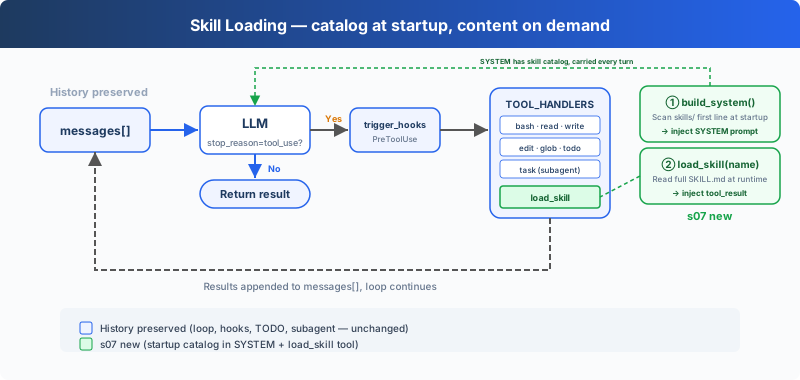 )
)
The minimal hook structure, todo_write, and sub-Agent from the previous chapter are preserved. This chapter focuses on the new load_skill tool. At startup, inject the skill catalog into the SYSTEM prompt; at runtime, register one more tool to load full content, spending tokens only when used.
Two-level design:
The dispatch mechanism is unchanged, load_skill auto-dispatches via TOOL_HANDLERS[block.name].
How It Works
skills/ directory, one subdirectory per skill, each containing a SKILL.md file:
Level 1: Inject catalog at startup: the harness calls _scan_skills() at startup to scan the skills/ directory, parsing each SKILL.md's YAML frontmatter (name, description) into a SKILL_REGISTRY dictionary. list_skills() generates the catalog from the registry, injected into the SYSTEM prompt. The Agent sees "which skills I have available" every turn, with no extra API calls:
Level 2: load_skill: the Agent decides "I need the SQL style guide" and calls load_skill("sql-style"). Lookup goes through the registry, not file paths, eliminating path traversal risk. The content is injected via tool_result:
The key distinction: skill content is not part of the system prompt. It enters the current messages as a tool result. Subsequent calls carry it along with the history until context compaction, truncation, or session end. This naturally connects to s08's compact: on-demand loading solves "don't carry what you shouldn't", compact solves "how to drop what you should."
Changes from s06
Try It
Try these prompts:
What skills are available?Load the code-review skill and follow its instructionsI need to do a code review -- load the relevant skill first
What to watch for: Does the Agent know available skills from the SYSTEM catalog? Does [HOOK] load_skill appear when full instructions are needed? Does the answer use the loaded skill's instructions?
What's Next
On-demand loading solved "don't carry what you shouldn't." But another problem looms: after the Agent works for 30 minutes, the messages list fills up with intermediate process. Old tool_results, stale file contents, occupying context but adding no value.
→ s08 Context Compact: A four-layer compaction strategy. Cheap layers run first, expensive layers run last.
Dive into CC Source Code
The following is based on analysis of CC source code
loadSkillsDir.ts,SkillTool.ts,bundledSkills.ts,commands.ts.
1. Skill Sources: Not Just One skills/ Directory
The teaching version assumes all skills live in a skills/ directory. CC loads from multiple sources spread across multiple files: loadSkillsDir.ts handles user/project/--add-dir directories and legacy commands (.claude/commands/); bundledSkills.ts handles built-in skills; SkillTool.ts handles MCP remote skills; commands.ts handles command aggregation. Types include managed/policy skills, user skills (~/.claude/skills/), project skills (.claude/skills/), --add-dir skills, legacy commands, dynamic skills, conditional skills (with paths frontmatter, activated by file path), bundled skills, plugin skills, MCP skills.
2. SKILL.md Frontmatter — Common Fields
CC's SKILL.md YAML frontmatter is parsed by parseSkillFrontmatterFields() in loadSkillsDir.ts. Common fields include:
The complete field list changes across versions; above are the core fields relevant to the teaching version.
3. Precise Implementation of Two-Level Loading
- Catalog (at startup):
getSkillDirCommands()scans directory → registers asCommandobjects containing only metadata.getSkillListingAttachments()formats the skill list as attachments, budgeted at ~1% of the context window (cap 8000 characters). - Load (on invocation): Model calls
Skilltool (input fields areskill+ optionalargs; teaching version usesname) →getPromptForCommand()expands full SKILL.md content →SkillToolreturns a tool_result with display text"Launching skill: {name}", while the actual skill content is injected vianewMessages. The teaching version merges both into "injected via tool_result" as a simplification.
The Teaching Version's Simplification Is Intentional
- Multiple files and sources → 1
skills/directory: sufficient to demonstrate the core concept of two-level loading - Multiple frontmatter fields → only parse name/description: reduces parsing complexity
- Forked skills (
context: 'fork') → omitted: the teaching version only expands inline skill loading Skilltool inputskill+args→ teaching version usesname: avoids extra argument parsing complexity